

A successful virtual classroom setup starts long before the first lesson begins. The decisions you make about your physical classroom, technology, and virtual synchronous classroom platform directly affect how well students can learn, participate, and stay engaged during live instruction. When every piece works together, teachers can focus on teaching instead of troubleshooting.
The aim is not to copy a traditional classroom online. Instead, you want to create a well-organized space where students have the right tools, a steady internet connection, and easy access to daily resources. With careful planning, your school can support strong teaching from the start.
What Is Livestreamed Instruction?
Livestreamed instruction, or synchronous instruction, means teachers and students meet together in real time. Rather than working alone, students receive live lessons, ask questions, work with classmates, and get instant feedback. This approach brings the feel of a traditional classroom to an online setting and lets schools offer more courses and handle staffing needs.
The key difference is with asynchronous programs. In those, students watch pre-recorded lectures and work through lessons on their own schedule. Synchronous instruction, on the other hand, is a live class led by a certified teacher and follows the school’s bell schedule. This checklist is based on the live, synchronous model.
Most districts use a platform for live instruction that connects with a Learning Management System (LMS). The LMS manages daily tasks like sharing course materials, turning in assignments, checking grades, and letting students and teachers communicate in one place.
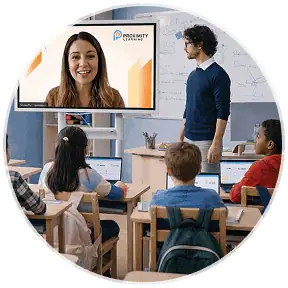
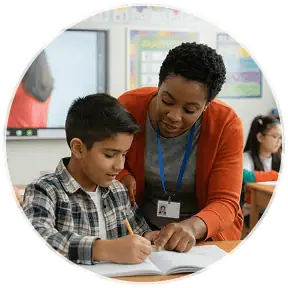
In class, students join through secure video calls, and the LMS keeps everything organized. An in-classroom facilitator helps students in person, making it easier for them to talk with the teacher, fix technical problems, and stay on task. Having this extra support is a big reason many schools prefer the synchronous model.
The Benefits of Live Virtual Learning
For principals, synchronous instruction has benefits that go far beyond convenience. It helps schools maintain high teaching standards and creates a stronger sense of connection for both students and teachers. Some key benefits are:
- Higher student engagement through real-time interaction and discussion
- Immediate feedback that strengthens understanding during each lesson
- Greater accountability because students attend scheduled live classes
- More opportunities for collaboration using interactive tools, interactive whiteboards, and breakout rooms
- Better visibility into student progress and classroom participation
- Flexibility to support hybrid learning and other modern education models
- Expanded access to certified teachers and specialized courses regardless of location
- Fewer disruptions throughout the school year, even during teacher vacancies
Your 7-Step Checklist to Set Up a Virtual Synchronous Classroom Successfully
Great teaching leads to student success, but principals are equally important in ensuring each classroom has the right technology, structure, and support before classes start. Planning ahead saves a lot of time and trouble later on.
Successful setups are not accidental. They follow a clear process that gets teachers, students, and classrooms ready for steady instruction from day one. Here are seven steps to get started.
1. Choose the Right Virtual Classroom Platform
The platform you pick affects almost every part of learning. It needs to be reliable, simple to use, and designed for live teaching, not just sharing content.
Look for a platform that integrates with your learning management systems and supports the daily needs of both teachers and students. At a minimum, it should include:
- Screen sharing for presentations and demonstrations
- Breakout rooms for small-group collaboration
- Interactive whiteboards for real-time instruction
- Built-in collaboration tools and chat features
- LMS integration for seamless access to assignments, grades, and course materials
- Compatibility with other apps your district already uses
Don’t pick a platform just because it’s familiar or cost-effective. The best choice makes technology easy and lets teachers focus on teaching.
2. Equip Every Classroom With the Right Technology
Even the best platform won’t work well with unreliable equipment. Before you start, make sure every classroom has what it needs for smooth video calls and live teaching.
Test every classroom before the first lesson, paying close attention to audio clarity, camera quality, and whether each room has a stable internet connection that can handle live instruction without interruptions.
Your technology checklist should include:
- A high-quality camera that clearly captures the classroom
- A microphone that minimizes background noise
- Speakers that allow students to hear instruction clearly
- A display large enough for all learners to see the teacher
- Reliable student computers
- Backup equipment for common technical issues
Test each room before the first lesson. Check that the sound is clear, the camera works well, and the internet connection stays strong when the building is busy.
3. Design the Physical and Virtual Learning Spaces
A thought-out classroom setup is about more than just technology. Both the room layout and the digital workspace should help students focus and avoid distractions. Consider what students see, hear, and use during class, and make choices that support learning.
When setting up each room:
- Position cameras so the teacher and classroom are clearly visible.
- Reduce background noise by limiting unnecessary conversations and outside distractions.
- Ensure lighting allows the teacher and classroom materials to be seen clearly on video.
- Arrange furniture so students can easily participate during discussions and activities.
- Keep instructional materials and technology within easy access of the facilitator or teacher.
- Design a clean, organized digital space that makes resources easy to find during class.
4. Prepare Teachers and Students Before the First Class

Before classes start, let teachers and students practice using the platform, try out its features, and get used to classroom routines. This preparation builds confidence and helps everyone focus on learning instead of struggling with new technology.
Training should include opportunities to:
- Practice joining and participating in a virtual class.
- Test cameras, microphones, and screen sharing.
- Learn how to submit assignments through your learning management systems.
- Use interactive tools, chat features, and breakout rooms.
- Access recorded lectures, message boards, and other course materials when appropriate.
- Understand how asynchronous learning supports live instruction between class sessions.
The way the teacher on screen and the facilitator in the room work together can make the difference between a smooth class and a rough one, so it’s worth practicing before students arrive.
5. Establish Clear Classroom Procedures and Expectations
Technology alone doesn’t create consistency. Students learn best when they know what’s expected every time they enter the virtual classroom. Take time before instruction begins to set clear expectations for behavior, participation, communication, and daily routines so everyone starts on the same page.
Your expectations should cover:
- Joining class on time and arriving prepared
- Appropriate camera and microphone etiquette
- How to ask questions and participate in discussions
- Expectations for completing assignments and independent tasks
- When to use chat, email, or other forms of communication
- Procedures for requesting help during or after class
6. Plan Lessons That Encourage Participation and Collaboration
Synchronous instruction works best when students actively participate instead of simply watching a screen. Encourage teachers to design each lesson with regular opportunities for interaction so students remain engaged from beginning to end. Even small moments of participation can strengthen understanding and improve attention.
Build engagement into every class by using:
- Polls and quick knowledge checks
- Interactive tools and interactive whiteboards
- Small-group discussions in breakout rooms and discussion boards
- Collaborative activities using shared documents and collaboration tools
- Short opportunities for students to present or explain their thinking
Since students are in the same room, partner and small-group work can happen face-to-face, just like always, with the teacher leading from the screen and the facilitator moving around to help.
7. Monitor Student Progress and Continuously Improve
A good virtual classroom setup is just the beginning. Keep checking student progress, ask teachers and students for feedback, and look for ways to improve all year long. Even small changes can lead to big improvements in engagement and results.
As you evaluate your program, consider questions like:
- Are students actively participating during live instruction?
- Are teachers using the platform’s features effectively?
- Which lessons generate the highest engagement?
- Do students regularly review content and complete assignments on time?
- Are there technology issues affecting participation or access?
- Are opportunities for hybrid learning or online education being fully utilized?
You Can Build a Stronger Virtual Classroom With Proximity Learning
Building a strong virtual classroom is about more than picking the right technology. Success comes from careful planning, dependable systems, and skilled teachers who know how to keep students interested online. When these parts work together, schools create interactive and lasting learning experiences.
This checklist is for those building their own virtual classrooms, and many districts do just that. But you don’t have to do it alone. For over 16 years, even before remote teaching became common, Proximity Learning has helped districts provide high-quality synchronous instruction. Today, we work with more than 150 school districts and have staffed over 5,000 classrooms across the country.
Each program brings together certified teachers, ESS-backed in-classroom facilitators, proven teaching methods, and support for getting started. This gives you a complete solution, not just another platform to manage. Districts can keep their current curriculum or work with us to create custom courses, and all instruction follows your school’s bell schedule. Whether you need to fill teacher gaps, add new courses, or start synchronous instruction for the first time, our team helps you build classrooms where students can succeed from day one.
Are you ready to create a virtual classroom that helps both students and teachers succeed? Contact Proximity Learning today to see how our live, synchronous instruction can support your district’s goals. We want to be your partner, not just another name on a vendor list.